
# Design report content
# Topic selection background
Shopping on online platforms such as Taobao and JD.com has gradually become a popular shopping method. However, counterfeit and shoddy products seriously harm consumers’ shopping experience on this intangible shopping platform. Even if we can protect our legitimate rights and interests by returning and refunding products without any reason within seven days, this wastes a lot of manpower and financial resources.
We hope to be able to purchase the desired product through the Internet at one time. In fact, before purchasing the product, we can check the shopping experience and product evaluation of previous buyers in the corresponding product store, and judge whether the product is worth buying through the product evaluation.
But this is not the case. In order to attract customers to buy goods, some merchants on online shopping platforms often deceive buyers by writing fake reviews. At the same time, there are also a large number of consumers attracted by the “cashback for good reviews” who inject a lot of fake reviews.
Although buyers are often able to screen out most of these reviews, manual screening is cumbersome and complicated. In fact, a good program for filtering reviews and reconstructing reviews can provide consumers with more authentic product information.
# Design basis
- Crawl and learn from Taobao comments
blog.csdn.net/qq_40946921/article/details/99684483
- Crawling JD.com pictures for learning
blog.csdn.net/dexing07/article/details/77938902
- Create word cloud learning
“Python Programming Fundamentals” 2nd Edition - 13.6 Creating a Word Cloud
# Design originality
-
Overall original design
-
Partly due to the modification of three items in 1.2 Design Basis
# Introduction to analysis, development and testing process
# analyze
Through data collection and analysis, we learned that the Taobao platform is more resistant to crawling than the JD platform. Therefore, in this design, we crawled comments and pictures from the JD.com platform for analysis, reconstruction, and creation of cloud images.
That is, the user enters a JD product link, the program analyzes and extracts the ID number in the chain, generates the URL of the product review through link splicing, extracts the lastpage (the last page of the review) from the review, divides the 0 to lastpage pages into two parts and assigns them to two threads for crawling, and crawls to obtain product reviews and product photos.
Filter the crawled comments, namely:
- Count each comment word by word. If a certain character appears repeatedly and abnormally in the comment (more than 30% of the total number of comments), it will be judged as a spamming comment;
(1) For example, when commenting: “This dress is particularly beautiful…”, the user enters the symbol ’ multiple times. ‘Complete some kind of praise cashback task assigned by the merchant or the platform’s evaluation task, resulting in the character’. ‘The recurrence rate is as high as 30%; (due to the excessive number of certain characters and the large denominator, the proportion is greater than 30%)
(2) For example, for a comment: “Good-looking”, the user only inputs two characters (the number of characters is less than 4) as a comment, which has little reference value, resulting in the recurrence rate of the characters “good” and “look” as high as 30%; (the total number of characters is too small, and the numerator is too small, resulting in a proportion greater than 30%)
- Perform a second screening on the comments retained in the first screening. Given some common words as praise keywords, count the number of praises for each comment. If the number of praises in a comment is more than 5, it is judged as too many praises;
Customized praise keywords: GoodComment={‘recommended’,’easy to use’,‘satisfied’,‘comfortable’,’like’,‘buy it’,‘discount’,‘very worth’,’like’,’exquisite’,‘repurchase’,‘beautiful’,‘good-looking’,‘good’,’new style’,‘affordable’,’ ‘Fast’, ‘Good effect’, ‘Very comfortable’, ‘Very soft’, ‘Very good fit’, ‘It really works’, ‘Good’, ‘Continue to buy’, ‘Very good’, ‘Very good’, ‘Good quality’, ‘Pretty good’, ‘Continue to buy’, ‘Exceptionally good’, ‘Pretty good’, ‘Always very satisfied’, ‘Exceptionally good-looking’}
The number of positive reviews is recorded twice for absolute positive reviews. For example, the positive review keywords {‘satisfied’, ‘very satisfied’} appear twice in the comment “very satisfied”, but appear only once in the review “relatively satisfied”, that is, certain screening is given to absolute positive reviews.
- If the total number of a single comment is less than 30 characters, the number of positive comments in a valid comment must not exceed 20% of the total number of characters in the comment; if the total number of a single comment is greater than 30 characters, the number of positive comments in a valid comment must not exceed 10% of the total number of characters in the comment and the repetition rate of a single character must not be higher than 20%;
(1) For example, a comment: “The clothes are good-looking, I am very satisfied with them, and they are very comfortable. Buy them.” The number of positive comments appears up to 5 times, and the total number of characters is 17. It is determined to be a fake review. (Due to too many positive reviews and the denominator being too large, the proportion is greater than 20%)
(2) For example, if the comment is “good-looking”, the total number of characters in the comment is 2, and the number of positive comments is 1, it is judged to be a fake comment. The user is completing a certain positive cashback task assigned by the merchant or an evaluation task on the platform, which is a task-type comment. (The total number of characters is too small, and the numerator is too small, causing the proportion to be greater than 20%)
# Development
- The first stage - crawling from Taobao to JD.com
For the first half of the experiment, I have been investing in crawling Taobao reviews and found that errors often occur in the second recent crawl of Taobao reviews after crawling a large amount of data. I spent a lot of time discovering errors caused by Taobao’s anti-crawling and researching how to bypass Taobao’s anti-crawling measures, and tried many different methods.
By searching for information, I accidentally discovered that crawling JD.com was easier than Taobao, so I finally gave up crawling Taobao reviews and turned to crawling JD reviews.
- The second stage - from low-speed crawling to high-speed crawling
For crawling a large number of comments on the JD platform, the speed is slow and the crawling time is long. In order to improve the crawling speed, multi-threading is used for crawling. However, it was found through testing that multi-threaded crawling can easily trigger JD.com’s anti-crawling mechanism.
The JD review page only displays the last 100 pages. After repeated testing, it was found that turning on dual threads can improve the crawling speed and can crawl a large amount of data without triggering the platform’s anti-crawling measures.
- The third stage - screening effective comments and visualizing them
Filter the product reviews crawled by the Jingdong platform, store the valid comments in the result list, store the eliminated comments in the reason list, and output them visually to an excel document. At the same time, the product pictures are stored according to user ID classification, and the effective comments and eliminated comments are made into word clouds and output for comparison.
- The fourth stage - perfecting the design
Improve the design and write a design report;
The files NEW comments.xlsx and eliminated comments.xlsx are excel files that store valid comments and eliminated comments. The stop_words.txt file is a stop word file downloaded from GitHub. all_word.png and comment_word.png are word cloud diagrams made of all comments and valid comments respectively. The photo folder is a picture of the crawled comments, and the subfolder is named after the ID number of the buyer who posted the comment.
# test
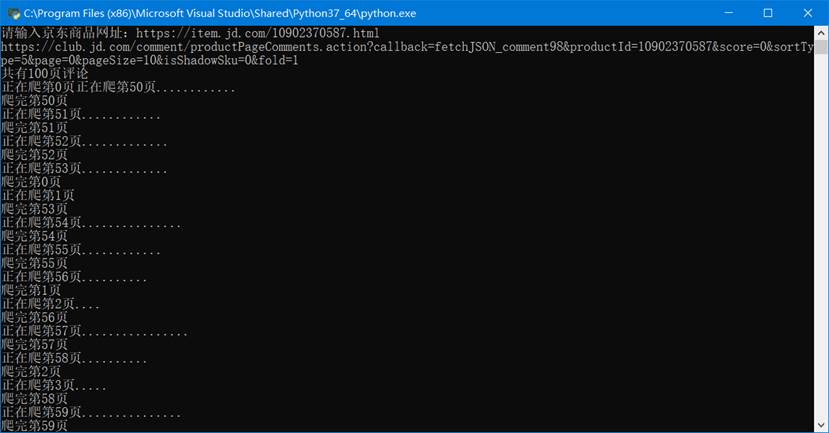
- Conduct a crawling test on a certain JD product. The link is https://item.jd.com/10902370587.html. The product review link after extracting the ID is: https://club.jd.com/comment/productPageCommen ts.action?callback=fetchJSON_comment98&productId=10902370587&score=0&sortType=5&page=0&pageSize=10&isShadowSku=0&fold=1;
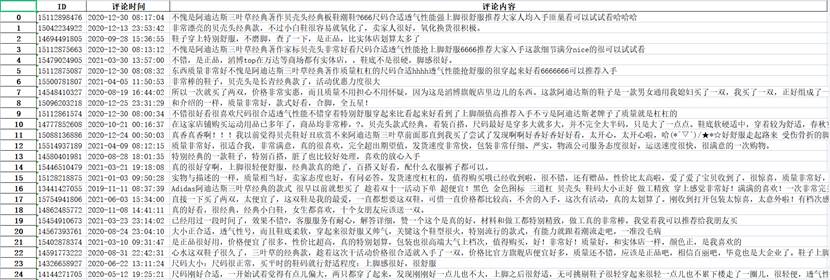
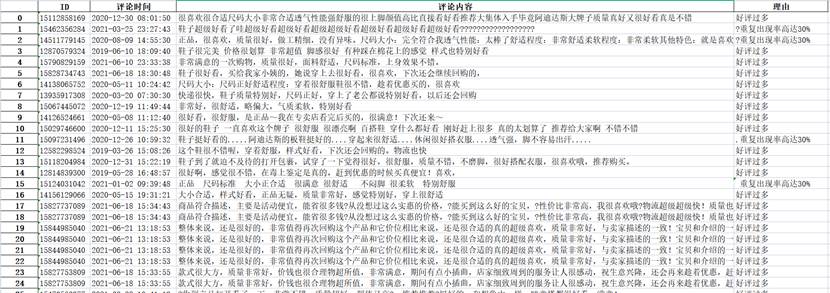
- Store valid comments in (NEW comments.xlsx), and record the ID number, comment time, and comment content of each comment; store eliminated comments in (Elimination Comments.xlsx), and record the ID number, comment time, comment content, and reason for elimination of each comment;

Some valid comments (NEW comments.xlsx)
Partial elimination of comments (elimination of comments.xlsx)
- Make a cloud image
Make a cloud chart of the filtered comment set and the filtered comment set
All comments generate cloud image (all_word.png)

Effective comments generate cloud image (comment_word.png)

- Comments and pictures are placed in the folder eliminate.py in the same folder as /photos/

# Self-evaluation
# Self-evaluation
-
Use a web crawler to crawl the comment information and pictures of the shopping platform, filter and classify the crawled comments and store them in two excel files (NEW comments.xlsx and eliminated comments.xlsx);
-
Check the saved eliminated comments.xlsx file and find that the filtered comments are indeed water-filled comments or false comments;
-
Compare all crawled comments and filtered comments into a word cloud, and find that the word cloud after filtering can better reflect the product situation;
-
The praise keywords are some words that I summarized during the test experiment, but the number is far from enough. By increasing the number of praise keywords, the review screening effect can be accurately improved. However, due to limited time, we did not achieve a large number of praise keywords;
-
Most of the favorable keywords are favorable keywords for shoes and clothing products. In order to highlight the function of the design program, I have deliberately crawled shoe products, but the screening effect in other product categories (such as mobile phones) is not good. The main reason is that the favorable keyword vocabulary is not complete enough;
-
Regarding the screening mechanism, I am quite satisfied with its overall screening mechanism, but there are some flaws. The ratio parameters of the number of positive comments to the number of words in comments, the number of positive comments parameters, and the ratio of single character repetitions set by this program need to be adjusted. When it reaches the optimal parameters, it can better ensure that water-filled comments and false comments are filtered out, while valid comments can be retained;
-
The parameters of this program are some parameters that I have summarized through repeated testing and running, but they have not reached the optimal level. I can definitely optimize the parameters through deep learning, but the implementation is complicated and the learning data set is difficult to obtain.
# Course summary, criticism and suggestions for the course
# Course Summary
By learning python programming, I am convinced that python is simpler and more flexible than the C language I learned before. For many functions that are difficult to achieve in C language that require a lot of code, python can be completed through direct calls.
Through this course design, I learned professional course knowledge such as crawlers and information processing, and gained a certain understanding of the role of Python in reality and what Python can do.
In the course design, I personally have my own solutions to the anti-crawling problems encountered during the crawling process. I personally made my own program using Python, which made me more interested in this course and gave me a full sense of accomplishment.
# Criticisms and suggestions for the course
It is definitely difficult for me to choose topics independently without any prompts. For me, most of the time I spend thinking about what needs to be done, rather than how to do it. For beginners of python, although the teacher gave everyone time to search the information to find out the direction of the python course, because they learned too little theoretical knowledge when looking for the direction of the course, I believe that most students were confused about what python could do at that time (at least I was like this). As the course progressed, there was huge pressure to gradually find the direction of their own course.
If teachers can give more suggestions in the course design, I believe that in the subsequent course design, everyone will not need to spend a lot of time looking for the direction of their own course design, and thus save a lot of time on course design, so that everyone can better complete their own course design, and may be able to improve the quality of the course design.
# appendix
|
|