Environment preparation
Download Node.js
https://nodejs.org/en/
After the installation is complete, Win+R enter cmd and open it. Enter node -v, npm -v and git --version in sequence and press Enter. The program version number will appear as shown below.
Create a Github Pages repository
Plus sign in the upper right corner of GitHub homepage -> New repository:
- Enter
username.github.io in Repository name
- Check “Initialize this repository with a README”
- Description optional
After filling in, click Create repository to create.
Username.github.io, where Repository name must be consistent with your own username. For example, the blogger’s github account name is win7ery, then set the Repository name to “win7ery.github.io”

ssh connection github
Enter ssh-keygen -t rsa -C "GitHub Email" and press Enter all the way.
Enter the [C:\Users\username.ssh] directory (check Show “hidden items”), use Notepad to open the public key id_rsa.pub file and copy the contents.
Log in to GitHub, enter the Settings page, select SSH and GPG keys in the left column, and click New SSH key.
Choose a random name for Title, paste the copied id_rsa.pub content into Key, and click Add SSH key to complete the addition.

Enter ssh -T [email protected] and “Are you sure…” will appear. Enter yes and press Enter to confirm.

“You’ve successfully authenticated, but GitHub does not provide shell access.” appears, indicating success.
Download hugo and stack themes
hugo download: https://github.com/gohugoio/hugo
stack theme download: https://github.com/CaiJimmy/hugo-theme-stack
- Download the above link file and set the hugo.exe environment variable
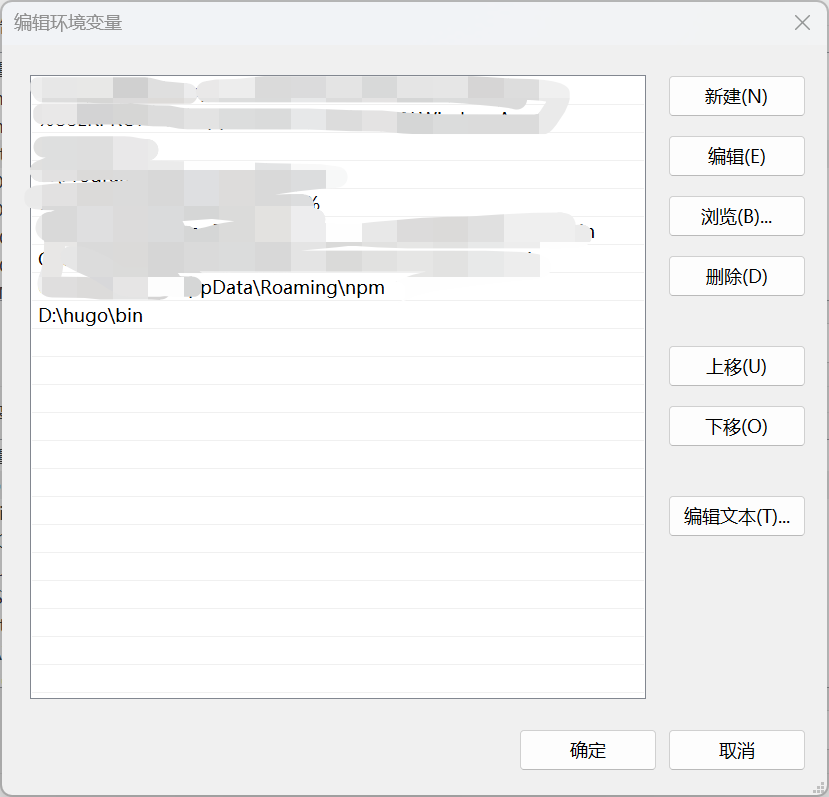
- Running
hugo new site ./path on the command line will generate a URL frame
1
2
3
4
5
6
7
8
9
|
.
├── archetypes # Store article templates
├── config.toml # Simple configuration file
├── content # Store articles
├── data # Store the configuration file when generating static pages
├── layouts # Templates to store page layouts
├── static # Store static content such as pictures
└── themes # Store downloaded themes
    └─hugo-theme-stack #Downloaded theme, empty or with default theme when first generated
|
Copy the downloaded stack theme and place it in the themes directory under the hugo folder.
Article content
There is an example article in .path\themes\hugo-theme-stack\exampleSite\content. Copy it to the content folder under .path. Now the file directory is
 1
 2
 3
 4
 5
 6
 7
 8
 9
10
11
12
13
14
15
16
17
18
19
20
21
22
23
|
.
├── archetypes # Store article templates
├── config.toml # Simple configuration file
├── content # Store articles
│   ├─categories
│   │  └─Test
│   ├─page
│   │  ├─about
│   │  ├─archives
│   │  ├─links
│   │  └─search
│   └─post
│      ├─chinese-test
│      ├─emoji-support
│      ├─markdown-syntax
│      ├─math-typesetting
│      ├─placeholder-text
│      └─rich-content
├── data # Store the configuration file when generating static pages
├── layouts # Templates to store page layouts
├── static # Store static content such as pictures
└── themes # Store downloaded themes
    └─hugo-theme-stack #Downloaded theme, empty or with default theme when first generated
|
Copy .path\themes\hugo-theme-stack\exampleSite\hugo.yaml to .path. At this time, the file directory is
 1
 2
 3
 4
 5
 6
 7
 8
 9
10
11
12
13
14
15
16
17
18
19
20
21
22
23
24
|
.
├── archetypes # Store article templates
├── config.toml # Simple configuration file
├── content # Store articles
│   ├─categories
│   │  └─Test
│   ├─page
│   │  ├─about
│   │  ├─archives
│   │  ├─links
│   │  └─search
│   └─post
│      ├─chinese-test
│      ├─emoji-support
│      ├─markdown-syntax
│      ├─math-typesetting
│      ├─placeholder-text
│      └─rich-content
├── data # Store the configuration file when generating static pages
├── layouts # Templates to store page layouts
├── static # Store static content such as pictures
├── themes # Store downloaded themes
│ └─hugo-theme-stack #Downloaded theme, empty or with default theme when first generated
└── hugo.yaml
|
And configure the content. The following is an example of hugo.yaml configuration for this website.
  1
  2
  3
  4
  5
  6
  7
  8
  9
 10
 11
 12
 13
 14
 15
 16
 17
 18
 19
 20
 21
 22
 23
 24
 25
 26
 27
 28
 29
 30
 31
 32
 33
 34
 35
 36
 37
 38
 39
 40
 41
 42
 43
 44
 45
 46
 47
 48
 49
 50
 51
 52
 53
 54
 55
 56
 57
 58
 59
 60
 61
 62
 63
 64
 65
 66
 67
 68
 69
 70
 71
 72
 73
 74
 75
 76
 77
 78
 79
 80
 81
 82
 83
 84
 85
 86
 87
 88
 89
 90
 91
 92
 93
 94
 95
 96
 97
 98
 99
100
101
102
103
104
105
106
107
108
109
110
111
112
113
114
115
116
117
118
119
120
121
122
123
124
125
126
127
128
129
130
131
132
133
134
135
136
137
138
139
140
141
142
143
144
145
146
147
148
149
150
151
152
153
154
155
156
157
158
159
160
161
162
163
164
165
166
167
168
169
170
171
172
173
174
175
176
177
178
179
180
181
182
183
184
185
186
187
188
189
190
191
192
193
194
195
196
197
198
199
200
201
202
203
204
205
206
207
208
209
210
211
212
213
214
215
216
217
218
219
220
221
222
223
224
225
226
227
228
229
230
231
232
233
234
235
236
237
238
239
240
241
242
243
244
245
246
247
248
|
baseurl: https://wintery.social
languageCode: zh-cn
theme: hugo-theme-stack
paginate: 5
title: Wintery
copyright: Wintery

# Theme i18n support
# Available values: ar, bn, ca, de, el, en, es, fr, hu, id, it, ja, ko, nl, pt-br, th, uk, zh-cn, zh-hk, zh-tw
DefaultContentLanguage: zh-cn

# Set hasCJKLanguage to true if DefaultContentLanguage is in [zh-cn ja ko]
# This will make .Summary and .WordCount behave correctly for CJK languages.
hasCJKLanguage: false

languages:
    zh-cn:
        languageName: Chinese
        title: Wintery
        weight: 2
        params:
            description: Wintery's blog
    # en:
    #     languageName: English
    #     title: Wintery
    #     weight: 1
    #     params:
    #         description: Wintery's blog

services:
    # Change it to your Disqus shortname before using
    disqus:
        shortname: "hugo-theme-stack"
    # GA Tracking ID
    googleAnalytics:
        id:

params:
    mainSections:
        - post
    featuredImageField: image
    rssFullContent: true
    favicon: favicon/favicon.ico # e.g.: favicon placed in `static/favicon.ico` of your site folder, then set this field to `/favicon.ico` (`/` is necessary)

    footer:
        since: 2024
        customText:

    dateFormat:
        published: Jan 02, 2006
        lastUpdated: Jan 02, 2006 15:04 MST

    sidebar:
        emoji: 🧐
        subtitle: ""
        avatar:
            enabled: true
            local: true
            src: img/img.png

    article:
        math: false
        toc: true
        readingTime: true
        license:
            enabled: true
            default: Licensed under CC BY-NC-SA 4.0

    comments:
        enabled: true
        provider: waline

        disqusjs:
            shortname:
            apiUrl:
            apiKey:
            admin:
            adminLabel:

        utterances:
            repo:
            issueTerm: pathname
            label:

        beaudar:
            repo:
            issueTerm: pathname
            label:
            theme:

        remark42:
            host:
            site:
            locale:

        vssue:
            platform:
            owner:
            repo:
            clientId:
            clientSecret:
            autoCreateIssue: false

        # Waline client configuration see: https://waline.js.org/en/reference/component.html
        waline:
            serverURL: https://waline.wintery.social
            lang:  zh-CN
            visitor: true
            avatar:
            emoji:
                - https://cdn.jsdelivr.net/gh/walinejs/emojis/weibo
                - https://cdn.jsdelivr.net/gh/walinejs/[email protected]/qq
            requiredMeta:
                - name
                - mail
                - url
            locale:
                admin: wintery
                placeholder: 'Say something...'

        twikoo:
            envId:
            region:
            path:
            lang:

        giscus:
            repo:
            repoID:
            category:
            categoryID:
            mapping:
            lightTheme:
            darkTheme:
            reactionsEnabled: 1
            emitMetadata: 0

        gitalk:
            owner:
            admin:
            repo:
            clientID:
            clientSecret:

        cusdis:
            host:
            id:
    widgets:
        homepage:
            - type: search
            - type: archives
              params:
                  limit: 5
            - type: categories
              params:
                  limit: 10
            - type: tag-cloud
              params:
                  limit: 10
        page:
            - type: toc

    opengraph:
        twitter:
            # Your Twitter username
            site:

            # Available values: summary, summary_large_image
            card: summary_large_image

    defaultImage:
        opengraph:
            enabled: false
            local: false
            src:

    colorScheme:
        # Display toggle
        toggle: true

        # Available values: auto, light, dark
        default: auto

    imageProcessing:
        cover:
            enabled: true
        content:
            enabled: true

### Custom menu
### See https://stack.jimmycai.com/config/menu
### To remove about, archive and search page menu item, remove `menu` field from their FrontMatter
menu:
    main: []

    social:
        - identifier: github
          name: GitHub
          url: https://github.com/Win7ery
          params:
              icon: brand-github

        - identifier: gitee
          name: Gitee
          url: https://gitee.com/win7ery
          params:
              icon: gitee

        - identifier: csdn
          name: CSDN
          url: https://blog.csdn.net/HUANGliang_
          params:
              icon: csdn

        - identifier: RSS
          name: RSS
          url: https://wintery.social/index.xml
          params:
              icon: rss

related:
    includeNewer: true
    threshold: 60
    toLower: false
    indices:
        - name: tags
          weight: 100

        - name: categories
          weight: 200

markup:
    goldmark:
        renderer:
            ## Set to true if you have HTML content inside Markdown
            unsafe: true
    tableOfContents:
        endLevel: 4
        ordered: true
        startLevel: 2
    highlight:
        noClasses: false
        codeFences: true
        guessSyntax: true
        lineNoStart: 1
        lineNos: true
        lineNumbersInTable: true
        tabWidth: 4
|
Run hugo server --config hugo.yaml in the .path directory to preview and run the web program locally.
 1
 2
 3
 4
 5
 6
 7
 8
 9
10
11
12
13
14
15
16
17
18
19
20
21
22
23
|
$ hugo server --config hugo.yaml
Watching for changes in D:\hugo\blogs\{archetypes,assets,content,data,i18n,layouts,static,themes}
Watching for config changes in D:\hugo\blogs\config.yaml, D:\hugo\blogs\themes\hugo-theme-stack\config.yaml
Start building sites …
hugo v0.125.5-c8b9f9f81c375f5b391e61bae711ee63fc76c1fd+extended windows/amd64 BuildDate=2024-05-01T15:22:11Z VendorInfo=gohugoio


                   | ZH-CN
-------------------+--------
  Pages            |    42
  Paginator pages  |     5
  Non-page files   |   133
  Static files     |     1
  Processed images |   283
  Aliases          |    12
  Cleaned          |     0

Built in 631 ms
Environment: "development"
Serving pages from disk
Running in Fast Render Mode. For full rebuilds on change: hugo server --disableFastRender
Web Server is available at http://wintery.net/ (bind address 127.0.0.1)
Press Ctrl+C to stop
|
Run hugo --config hugo.yaml in the .path directory to update and generate the official public website file.
Push the pubilc folder git push to the github warehouse. After the github page is deployed, you can open the URL through the URL username.github.io (about 1 minute)
Stack theme beautification
Home Page Avatar
Just place the file img.png in the .\path\themes\hugo-theme-stack\assets\img directory and modify it in hugo.yaml
1
2
3
4
5
6
7
|
    sidebar:
        emoji: 🧐
        subtitle: ""
        avatar:
            enabled: true
            local: true
            src: img/img.png
|
Theme Beautification
Reference herehttps://www.xalaok.top/post/stack-modify/
All the following file operations are performed under .\path\themes\hugo-theme-stack
Add the following code to /assets/scss/custom.scss:
  1
  2
  3
  4
  5
  6
  7
  8
  9
 10
 11
 12
 13
 14
 15
 16
 17
 18
 19
 20
 21
 22
 23
 24
 25
 26
 27
 28
 29
 30
 31
 32
 33
 34
 35
 36
 37
 38
 39
 40
 41
 42
 43
 44
 45
 46
 47
 48
 49
 50
 51
 52
 53
 54
 55
 56
 57
 58
 59
 60
 61
 62
 63
 64
 65
 66
 67
 68
 69
 70
 71
 72
 73
 74
 75
 76
 77
 78
 79
 80
 81
 82
 83
 84
 85
 86
 87
 88
 89
 90
 91
 92
 93
 94
 95
 96
 97
 98
 99
100
101
102
103
104
105
106
107
108
109
110
111
112
113
114
115
116
117
118
119
120
121
122
123
124
125
126
127
128
129
130
131
132
133
134
135
136
137
138
139
140
141
142
143
144
145
146
147
148
149
150
151
152
153
154
155
156
157
158
159
160
161
162
163
164
165
166
167
168
169
170
171
172
173
174
175
176
177
178
179
180
181
182
183
184
185
186
187
188
189
190
191
192
193
194
195
196
197
198
199
200
201
202
203
204
205
206
207
208
209
210
211
212
213
214
215
216
217
218
219
|
//Basic color matching of the page
:root {
  //Global top margin
  --main-top-padding: 30px;
  // Global card rounded corners
  --card-border-radius: 25px;
  // tag cloud card rounded corners
  --tag-border-radius: 8px;
  // card spacing
  --section-separation: 40px;
  //Global font size
  --article-font-size: 1.8rem;
  //Inline code background color
  --code-background-color: #f8f8f8;
  //Inline code foreground color
  --code-text-color: #e96900;
  // Style in dark mode
  &[data-scheme="dark"] {
    //Inline code background color
    --code-background-color: #ff6d1b17;
    //Inline code foreground color
    --code-text-color: #e96900;
  }
}

//------------------------------------------------------
//Fix the problem of narrow page display of reference block content
a {
  word-break: break-all;
}

code {
  word-break: break-all;
}

//---------------------------------------------------
// Article content image rounded shadow
.article-page .main-article .article-content {
  img {
    max-width: 96% !important;
    height: auto !important;
    border-radius: 8px;
  }
}

//------------------------------------------------
//Article content quote block style
.article-content {
  blockquote {
    border-left: 6px solid #358b9a1f !important;
    background: #3a97431f;
  }
}
// ---------------------------------------
// Modify the basic style of the code block
.highlight {
  max-width: 102% !important;
  background-color: var(--pre-background-color);
  padding: var(--card-padding);
  position: relative;
  border-radius: 20px;
  margin-left: -7px !important;
  margin-right: -12px;
  box-shadow: var(--shadow-l1) !important;

  &:hover {
    .copyCodeButton {
      opacity: 1;
    }
  }

  // keep Codeblocks LTR
  [dir="rtl"] & {
    direction: ltr;
  }

  pre {
    margin: initial;
    padding: 0;
    margin: 0;
    width: auto;
  }
}

// Code block style adjustment in light mode
[data-scheme="light"] .article-content .highlight {
  background-color: #fff9f3;
}

[data-scheme="light"] .chroma {
  color: #ff6f00;
  background-color: #fff9f3cc;
}

//-------------------------------------------
//Set the background color of the selected font area
//Modify selected color
::selection {
  color: #fff;
  background: #34495e;
}

a {
  text-decoration: none;
  color: var(--accent-color);

  &:hover {
    color: var(--accent-color-darker);
  }

  &.link {
    color: #4288b9ad;
    font-weight: 600;
    padding: 0 2px;
    text-decoration: none;
    cursor: pointer;

    &:hover {
      text-decoration: underline;
    }
  }
}

//-------------------------------------------------
//Change the height of the article cover
.article-list article .article-image img {
  width: 100%;
  height: 150px;
  object-fit: cover;

  @include respond(md) {
    height: 200px;
  }

  @include respond(xl) {
    height: 305px;
  }
}

//---------------------------------------------------
// Global page layout spacing adjustment
.main-container {
  min-height: 100vh;
  align-items: flex-start;
  padding: 0 15px;
  gap: var(--section-separation);
  padding-top: var(--main-top-padding);

  @include respond(md) {
    padding: 0 37px;
  }
}

//--------------------------------------------------
//Adjust the width of three columns on the page
.container {
  margin-left: auto;
  margin-right: auto;

  .left-sidebar {
    order: -3;
    max-width: var(--left-sidebar-max-width);
  }

  .right-sidebar {
    order: -1;
    max-width: var(--right-sidebar-max-width);

    /// Display right sidebar when min-width: lg
    @include respond(lg) {
      display: flex;
    }
  }

  &.extended {
    @include respond(md) {
      max-width: 1024px;
      --left-sidebar-max-width: 25% !important;
      --right-sidebar-max-width: 22% !important;
    }

    @include respond(lg) {
      max-width: 1280px;
      --left-sidebar-max-width: 20%;
      --right-sidebar-max-width: 30%;
    }

    @include respond(xl) {
      max-width: 1453px; //1536px;
      --left-sidebar-max-width: 15%;
      --right-sidebar-max-width: 25%;
    }
  }

  &.compact {
    @include respond(md) {
      --left-sidebar-max-width: 25%;
      max-width: 768px;
    }

    @include respond(lg) {
      max-width: 1024px;
      --left-sidebar-max-width: 20%;
    }

    @include respond(xl) {
      max-width: 1280px;
    }
  }
}

//-------------------------------------------------------
//Fine-tuning the global page small picture style
.article-list--compact article .article-image img {
  width: var(--image-size);
  height: var(--image-size);
  object-fit: cover;
  border-radius: 17%;
}
|
Modify layout
Modify the description of left-sidebar and right-sidebar in /assets/scss/grid.scss:
 1
 2
 3
 4
 5
 6
 7
 8
 9
10
11
12
13
14
15
16
|
    .left-sidebar {
        order: -3;
        // max-width: var(--left-sidebar-max-width);
        max-width: 10%;
    }

    .right-sidebar {
        order: -1;
        // max-width: var(--right-sidebar-max-width);
        max-width: 20%;

        /// Display right sidebar when min-width: lg
        @include respond(lg) {
            display: flex;
        }
    }
|
Changed the proportion of main text to 70%, the original was only about 50%
You can also modify the code in /assets/scss/custom.scss
@include respond(md) {
  max-width: 1024px;
  --left-sidebar-max-width: 10% !important;
  --right-sidebar-max-width: 20% !important;
}
Archive
Dual column setup
Add the following code to /assets/scss/custom.scss:
 1
 2
 3
 4
 5
 6
 7
 8
 9
10
11
12
13
14
15
16
17
18
|
//Two columns on the archive page
@media (min-width: 1024px) {
  .article-list--compact {
    display: grid;
    grid-template-columns: 1fr 1fr;
    background: none;
    box-shadow: none;
    gap: 1rem;

    article {
      background: var(--card-background);
      border: none;
      box-shadow: var(--shadow-l2);
      margin-bottom: 8px;
      border-radius: 16px;
    }
  }
}
|
Card zoom animation
Add the following code to /assets/scss/custom.scss:
1
2
3
4
5
6
7
8
9
|
/*-----------Archive page----------*/
//Archive page card zoom
.article-list--tile article {
  transition: .6s ease;
}

.article-list--tile article:hover {
  transform: scale(1.03, 1.03);
}
|
Youlian three columns
Add the following code to /assets/scss/custom.scss
 1
 2
 3
 4
 5
 6
 7
 8
 9
10
11
12
13
14
15
16
17
18
19
20
21
22
|
//Three columns of friendly links
@media (min-width: 1024px) {
  .article-list--compact.links {
    display: grid;
    grid-template-columns: 1fr 1fr 1fr;
    background: none;
    box-shadow: none;
    gap: 1rem;

    article {
      background: var(--card-background);
      border: none;
      box-shadow: var(--shadow-l2);
      margin-bottom: 8px;
      border-radius: var(--card-border-radius);

      &:nth-child(odd) {
        margin-right: 8px;
      }
    }
  }
}
|
Font settings
Add code to layouts/partials/head/custom.html. For more fonts, you can go to Browse Fonts - Google Fonts to select and modify customFont.href
 1
 2
 3
 4
 5
 6
 7
 8
 9
10
11
12
13
14
15
16
17
18
|
<style>
    :root {
        --article-font-family: "Noto Serif SC", var(--base-font-family);
    }
</style>

<script>
		(function () {
		    const customFont = document.createElement('link');
		    customFont.href = "https://fonts.googleapis.com/css2?family=Long+Cang&family=Ma+Shan+Zheng&family=Noto+Serif+SC:wght@200;300;400;500;600;700;900&display=swap";


		    customFont.type = "text/css";
		    customFont.rel = "stylesheet";

		    document.head.appendChild(customFont);
		}());
</script>
|
Reference here: https://zhuanlan.zhihu.com/p/667654280
Blog heat map and visitor map
https://blog.douchi.space/hugo-blog-heatmap/#gsc.tab=0
https://www.cnblogs.com/guoxinyu/p/blog-player-ClustrMaps.html
